


FAQ
Range, obstacles, Wi-Fi, memory, legality, privacy: the questions people ask before and after building a receiver, answered plainly.
Is it legal to listen?
Receiving is passive: your antenna transmits nothing. ADS-B is broadcast in the clear precisely so that everyone can hear it, and the data is shown on public maps all day long. In most countries, receiving radio signals that are broadcast unencrypted is lawful; sharing them with the tracking networks is what thousands of people do openly. If your country has specific rules on radio reception, check them; this site is not legal advice.
How far will I hear?
As far as your antenna can see. The signal travels in a straight line, so the question is what stands between your antenna and the sky. A window: a few dozen kilometres, more on the side the window faces. A balcony or a loft under tiles: often 150 to 250 km. A roof with a clear horizon: 300 km and beyond, towards aircraft at cruising altitude. Low aircraft near you are hidden by buildings and trees, whatever you do. Nothing about the Raspberry Pi changes the range.
My map is empty
Give it ten minutes after the first start. Then check, in this order: the stick is in a USB 2.0 port (black, not the blue USB 3.0 ones on a Pi 4); the antenna is screwed on and vertical; it is near a window. If the stick is seen but nothing comes, the gain may be too high or too low: the menu lets you move it one step at a time, and the statistics show the effect.
Is Wi-Fi enough?
Yes for the receiver and the feeders: a few kilobytes per second. The wall on a tablet is also light. What Wi-Fi does badly is reliability: a Pi outdoors at the edge of the signal will drop off now and then. A cable fixes it; so does moving the Pi, since the antenna cable can be a few metres long. ZenithBoard’s watchdogs reconnect the Pi when the network comes back.
Is 1 GB of memory enough?
Measured, yes. On the author’s Pi 3B with ADS-B Exchange and its MLAT, FlightAware, Flightradar24, the wall, the statistics and the Bluesky posts running, 656 MB of 1 GB were still free. A Pi Zero 2 W with 512 MB runs the receiver and the wall; add the extra feeders and it becomes tight. Do not buy a bigger Pi for this: range comes from the antenna.
Does it slow my internet, or cost data?
No. A feeder sends a few kilobytes per second, less than a radio stream. Over a month that is a few gigabytes at most, shared across the networks you feed.
Who can see my position?
The networks you feed need it to compute ranges and MLAT, and keep it in your account. They do not put a pin on your house on the public map. ZenithBoard never shows your position on the wall nor in a post: the posts name your town, not your coordinates. Your wall and your own map answer your home network only, unless you open them yourself, and ZenithBoard explains a VPN before it explains an open port.
What is MLAT, and why does my receiver need others?
MLAT is short for multilateration. It is how a network finds an aircraft that sends its identity but not its position, which older transponders do: they answer “I am here” without the “here”.
The trick is time. Radio travels at the speed of light, about 300 metres every microsecond. When such an aircraft transmits, every receiver within reach hears the same message, but not at the same instant: the nearest one hears it first, a farther one a few hundred microseconds later. One receiver alone learns nothing from that; it has no idea when the message left the aircraft. But put four receivers together, each with a very precise clock, and the differences between their arrival times leave only one place in the sky the message can have come from. That place is drawn, and the aircraft appears on the map.
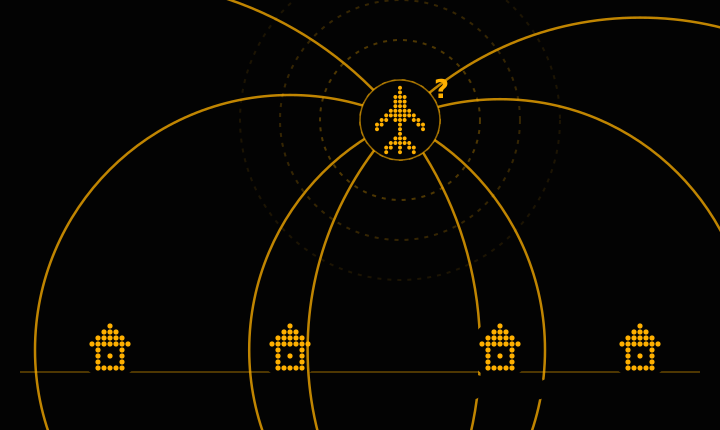
In the picture: four receivers, four arrival times, four circles. Each circle is “the aircraft is this far from me”. They meet in one place, and only one. That is MLAT, and it is why the networks ask every feeder to send the exact time each message arrived, not just the message.
So your single receiver cannot do MLAT on its own, and that is the honest answer to “why share?”: by feeding a network, your antenna becomes one of the four, and aircraft that say nothing about their position start appearing, on the networks’ maps and, through the data they send back, on yours. It also explains two things ZenithBoard does: it keeps one MLAT client running (the arithmetic is heavy for a Raspberry Pi), and it needs your antenna’s exact position, because a circle drawn from the wrong place meets the others at the wrong point.
Will the wall show every aircraft?
Every aircraft that broadcasts its position and is inside the radius you chose. Aircraft with older transponders that send no position appear only if a network’s MLAT locates them, and only on the networks’ maps. Some military and state aircraft do not broadcast at all. The wall says what it hears, no more.
What about the United States and 978 MHz?
In the United States, many small aircraft use 978 MHz (UAT) instead of 1090 MHz. Hearing them needs a second stick and a second antenna. ZenithBoard asks your region once; if you answer United States, it offers the extra step and starts with imperial units. Elsewhere, nothing about 978 MHz is shown.
Can I run it without a Raspberry Pi?
The receiver and the feeders run on any Linux computer. ZenithBoard itself targets Raspberry Pi OS; the wall’s demo runs on any computer with Python, with no hardware at all, if you just want to see what it looks like.
Is any of this a product?
No. ZenithBoard is free software under the GPL; this site’s text is under a Creative Commons licence; nothing is sold, no account is needed, there is no telemetry and this site sets no cookie and calls no third party. The only money that moves is a beer, if you feel like it, at the bottom of every page.